 Boardtone
Make your quiet keyboard sound mechanical.
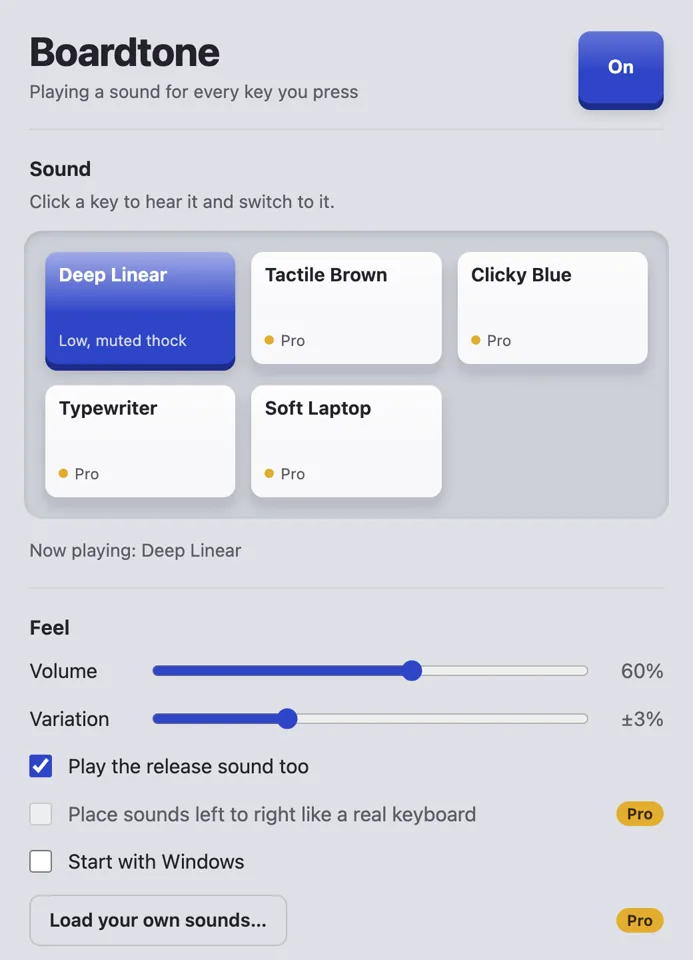
Boardtone plays a short switch sound each time you press a key, in any Windows app. It never records what you type.
One payment, tax included. The free version comes with the Deep Linear sound.
Listen to the five sounds
Press a key to hear it type “HELLO WORLD” and Enter. Headphones help.
Now playing: Deep Linear
Every key gets its own sound.
The sounds come from Boardtone’s own sound engine. They are not recordings of other products.
How it sounds
- Five built-in sounds: Deep Linear, Tactile Brown, Clicky Blue, Typewriter and Soft Laptop.
- Each kind of key has six variations, so typing the same letter twice doesn’t give you two identical clicks.
- Space Enter Backspace and the modifier keys each have their own deeper sound. Typewriter rings a bell when you press Enter.
- An optional second, softer sound plays when a key is released.
- The Variation slider shifts the pitch of each press slightly at random.
- Holding a key down plays one press, not a machine-gun burst of repeats.
- Each sound sits left or right to match where the key is on the keyboard.Pro
Your own soundsPro
Put WAV files and a short pack.json file in a folder, then load the folder in Boardtone. A pack can have separate sounds for key down, key up, Space, Enter, Backspace and modifier keys.
Everyday use
- Works in every app, including your browser, editor and chat apps.
- Turn the sounds on and off with one click.
- Choose whether Boardtone starts with Windows.
- Closing the window keeps the sounds playing in the background. Open Boardtone again to bring the window back, or click Quit Boardtone to stop it.
Free, or Pro for $7.99 once.
Pro is a single purchase, not a subscription. One license key works on up to three computers.
| Feature | Free | Pro |
|---|---|---|
| Deep Linear sound | ||
| Tactile Brown, Clicky Blue, Typewriter and Soft Laptop | ||
| Separate sounds for Space, Enter, Backspace and modifier keys | ||
| Key release sound and pitch variation | ||
| Stereo placement by key position | ||
| Your own WAV sound packs | ||
| Price | Free | $7.99once, tax included |
Checkout is handled by Creem. Your license key arrives by email; paste it into Boardtone to unlock Pro.
Get Boardtone for Windows.
Coming to the Microsoft Store
Boardtone isn’t listed yet. This page will link to it as soon as it is. If you buy Pro before then, keep the email with your key and paste it in after you install Boardtone.
Questions
Does Boardtone record what I type?
No. Boardtone has to know when a key goes down or comes up so it can play the matching sound. It doesn’t record, store or send what you type. There is no account and there are no ads.
The privacy policy lists exactly what the app keeps on your computer and what it sends.
When does Boardtone go online?
Only to check a Pro license key: once when you activate it, and about once a week after that. The free version doesn’t go online at all.
If you are offline, Pro keeps working for up to 45 days.
Why is there no sound in some windows?
Windows doesn’t let regular apps hear keys typed into programs that run as administrator, so Boardtone is silent while such a program is in front. The same goes for the sign-in screen and User Account Control prompts.
Where does the sound play?
Through your default Windows sound output, so your speakers or headphones.
Is Pro a subscription?
No. Pro costs $7.99 once, tax included. Creem handles the payment as our merchant of record and sends the receipt.
How many computers can I use Pro on?
One key works on up to three computers. To move it to another one, click Remove license from this computer in Boardtone, then paste the key on the new computer.
Can I use my own sounds?
Yes, with Pro. Put WAV files and a short pack.json file in a folder, then load the folder in Boardtone. A pack can have separate sounds for key down, key up, Space, Enter, Backspace and modifier keys.
Which languages does the app support?
The app’s interface is in English.
I lost my license key.
Write to hello@docfaro.com from the email address you used at checkout.